Nir G


Time & Task Management
Comprehensive Attendance & Billing System Alignment
Mobile
Native
Complex system
Summary
Background
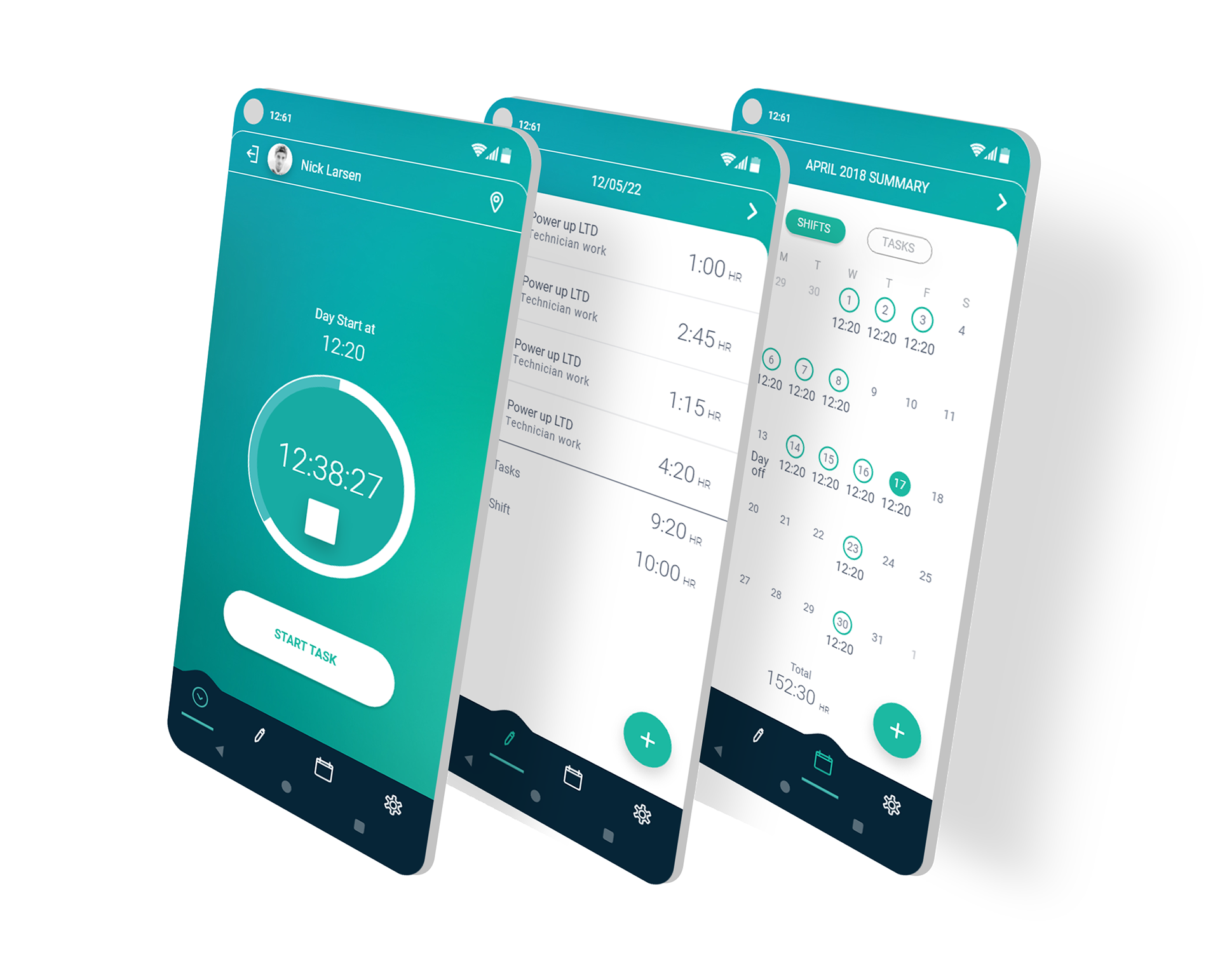
Punchio is a vital service within the iCount ecosystem, managing the intersection of employee attendance (pay slips) and task reporting (client billing). The project required building a native mobile application almost from scratch to serve a vast range of businesses and personas.
Main challenge
Creating a unified, simple experience for a diverse user base—from solo freelancers to large-scale HR departments—while solving the critical problem of "forgotten reports" and manual data entry.
CLIENT
iCount
SERVICES
- UX Strategy & Research
- Persona Characterization
- Information Architecture
- Native Mobile UI/UX
- Branding & Logo Design
Impact
Driving Engagement & Revenue: The app transformed from a neglected feature into a high-demand add-on purchased by a growing share of iCount's customers, leading to a direct increase in company revenue and a drastic reduction in HR manual overhead.
High-Demand Add-On
Transformed from a neglected feature into a purchased upgrade.
HR Overhead Reduced
Eliminated manual attendance tracking and reporting errors.
New Revenue Stream
Created a new, direct source of company revenue.

Research & Definition
01
User Insights
Conducted in-depth interviews across freelancers, company managers, and employees at both product companies and project/agency companies, covering a range of roles. Identified that "forgetting to sign in/out" was the #1 pain point, creating a massive administrative burden on HR.
02
Competitor Analysis
Examined standalone time-clocks versus integrated systems. Identified Punchio's core advantage: seamless integration where data flows directly into iCount's accounting engine.
03
Persona Mapping
Synthesized the interview findings into three personas, mapping how work patterns, hour tracking, and payroll needs differ across freelance, in-house, and agency employment models — detailed below.
FREELANCE
The Freelancer
Manages tasks tied to end-of-day invoicing, comparing actual vs. reported hours to catch mispricing.
IN-HOUSE
The Product Company Employee
Needs accurate hour tracking for payroll — actual hours, missing hours, vacation, and sick leave.
AGENCY
The Project/Agency Employee
Needs both: what to pay the employee, and what to bill the client for the same hours worked.
Wire frame

How I Approached the Problem
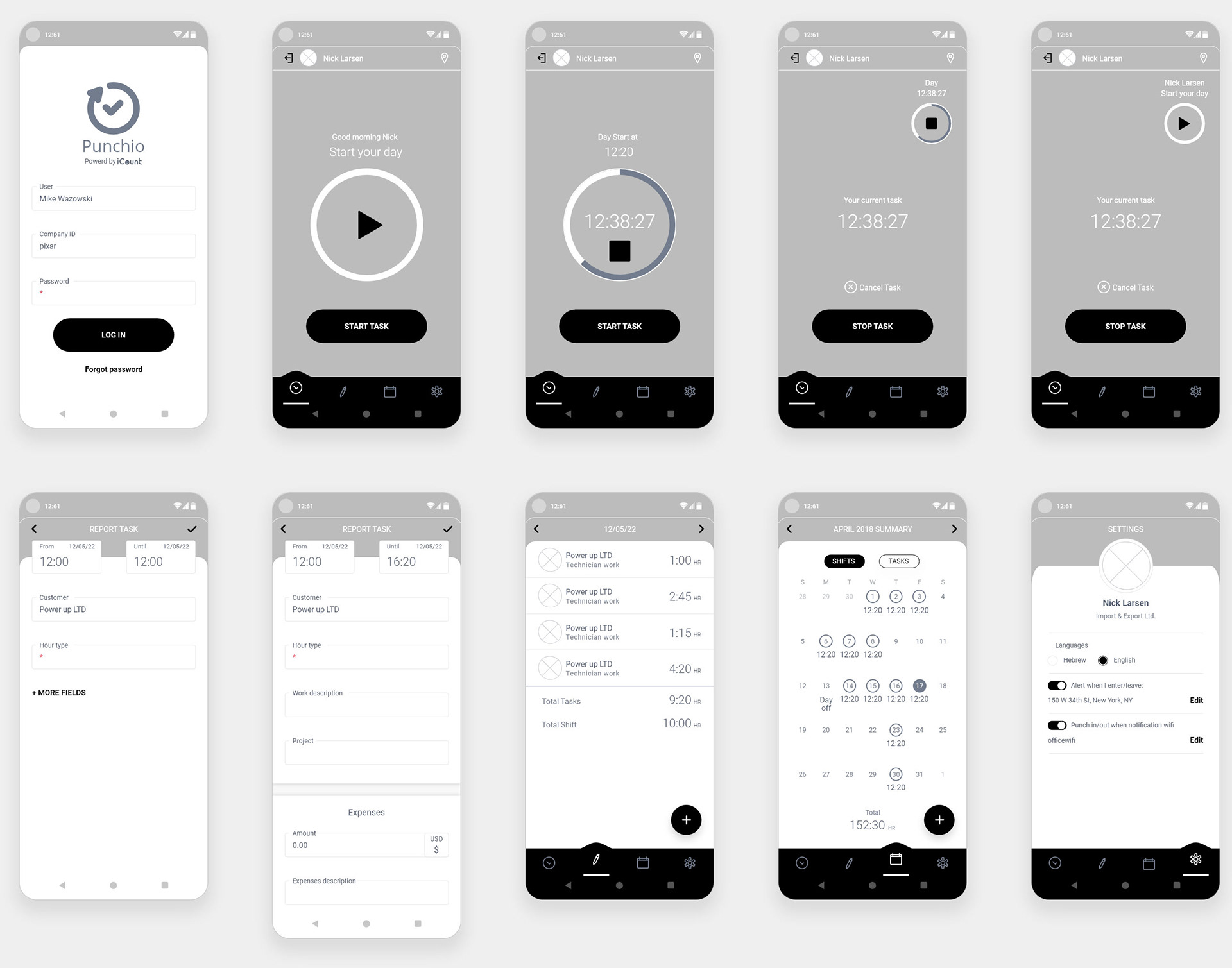
- Efficiency and Space Utilization Implemented a Bottom Navigation for direct transitions between tasks. I simplified the system to show only relevant actions, moving complex accounting operations (payslips, requests) to the main web system to keep the mobile experience focused and lean.
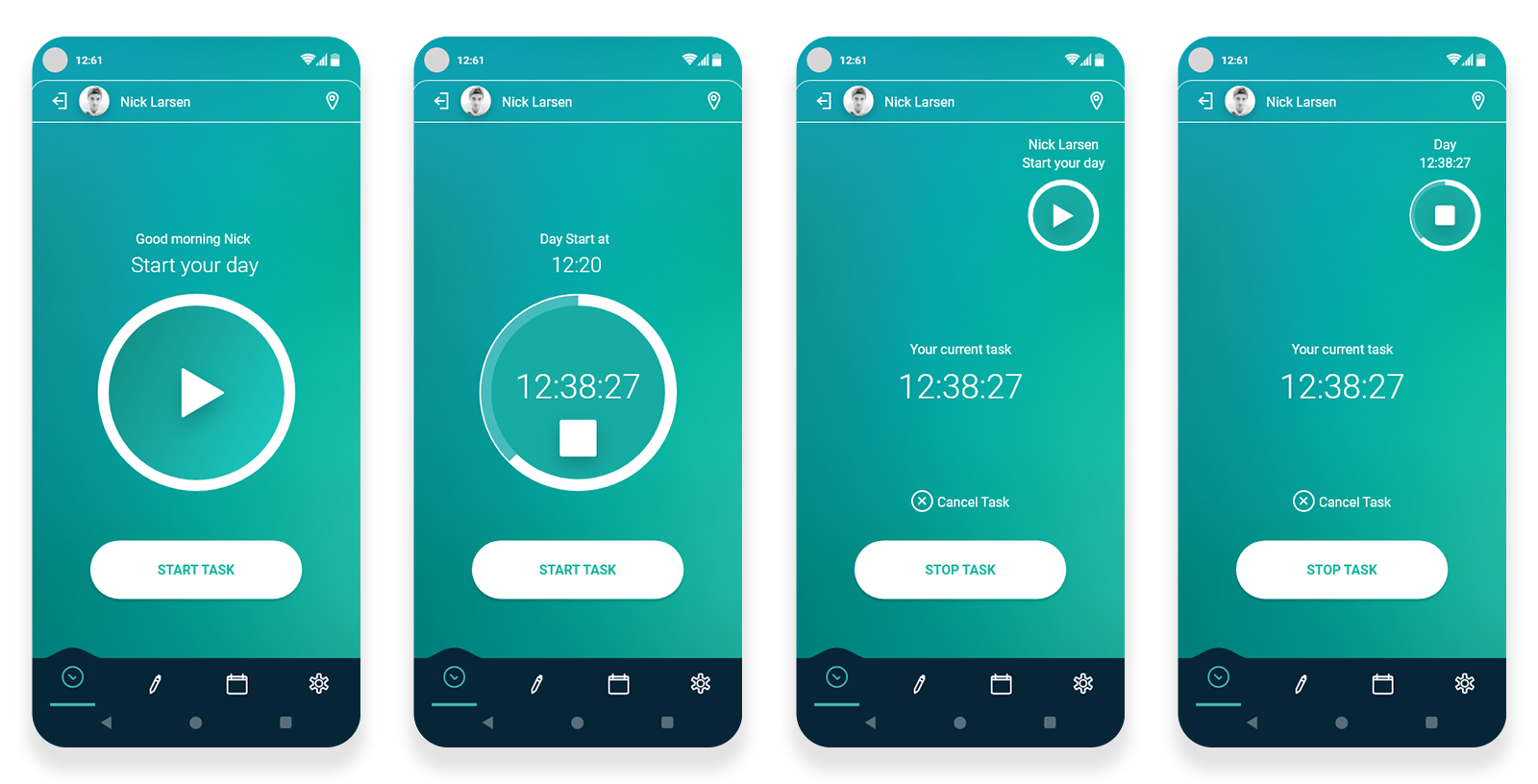
- Dynamic Data Reflection To solve the lack of transparency, I designed a real-time Progress Indicator. Users see their daily and monthly hour quotas filling up as they work. This visual feedback helps employees make informed decisions, like staying for overtime to meet monthly goals.
- De-coupling Attendance & Tasks The system was re-architected to separate "Start Day" from "Task Reporting." This flexibility allows different personas—like freelancers or agency employees—to report tasks independently of their overall attendance, tailored precisely to their workflow
Time & Task user flow
Designing Around Human Error
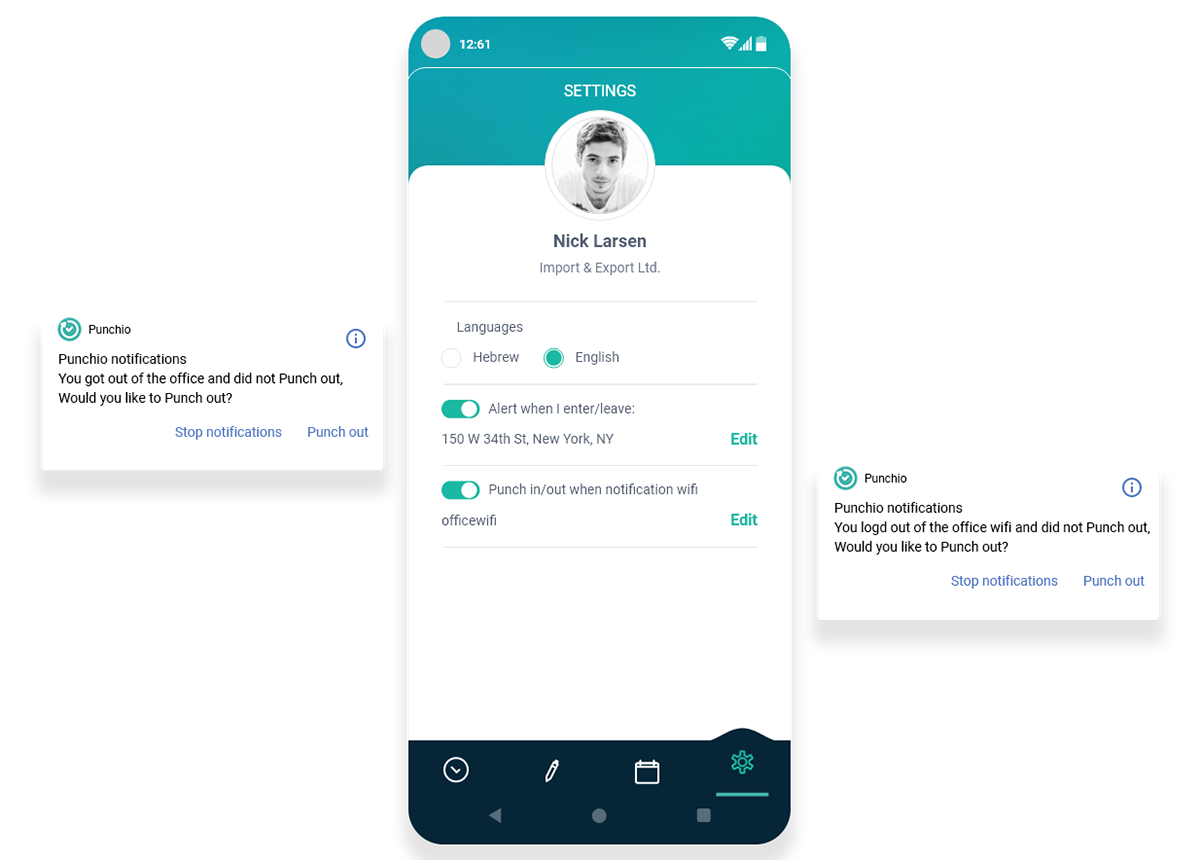
- The "Forgetfulness" Solution To tackle the most common user problem, I collaborated with developers to implement Geofencing and Wi-Fi logic. The system recognizes when a user enters a 500m radius of the office or connects to the office Wi-Fi, sending proactive alerts to ensure accurate reporting.
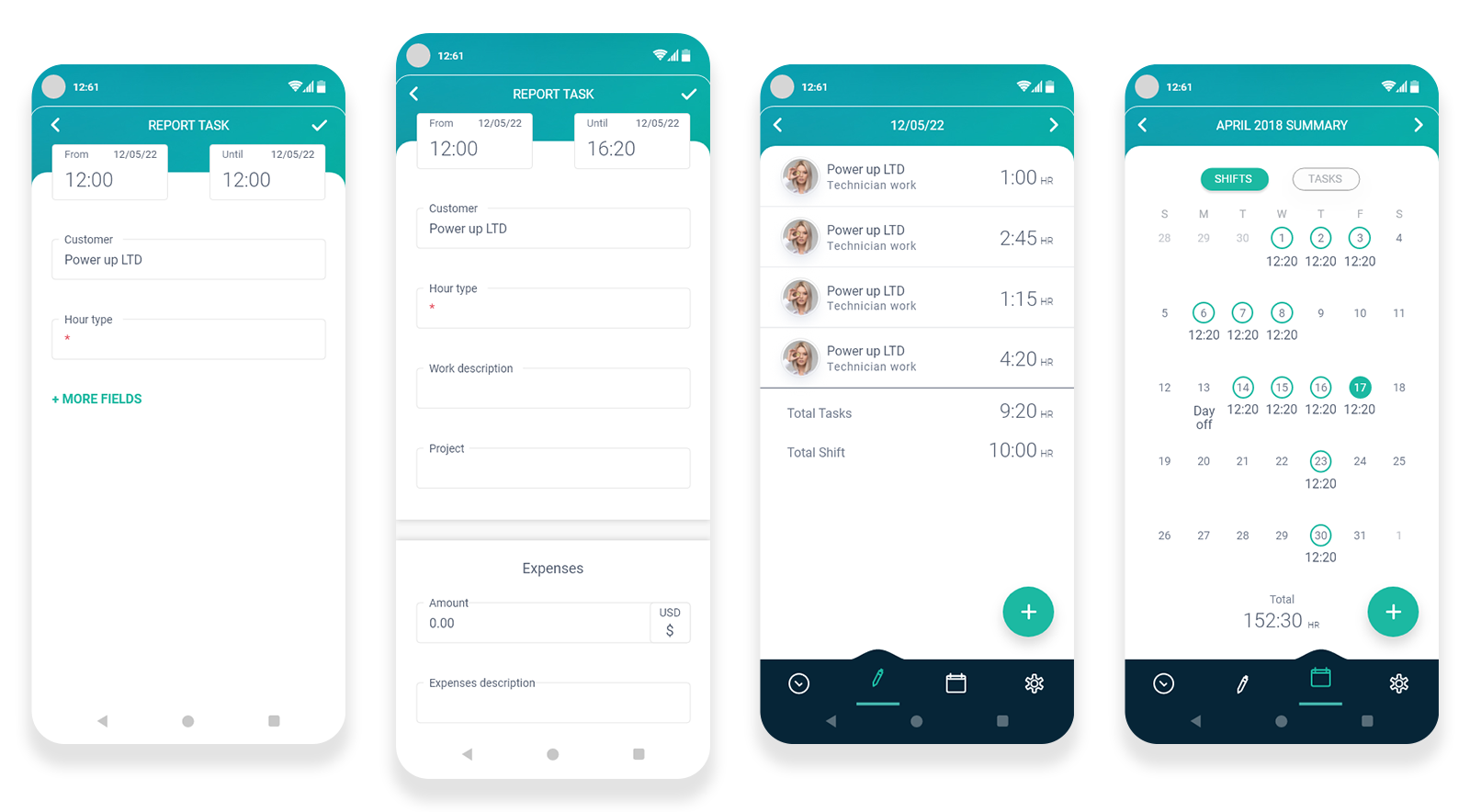
- Action Clarity in Task Reporting Task reporting was designed to be "Simple yet Powerful." It handles complex data like customer-specific rates and sales commissions, while saving both "Actual" and "Billed" time to allow for accurate end-of-month summaries.
Notification
Report
Effect
Separating "Start Day" from "Task Reporting" was the structural call that made this work for all three personas at once. That decision created a significant shift in user behavior: a clean interface and focused flow drove high user satisfaction, and the result is a robust, native tool that simplifies complex business requirements.
Ready to create
great things
Got a complex challenge? Let's solve it together.
Let's talk

Download Resume




Time & Task Management
Comprehensive Attendance & Billing System Alignment
Mobile
Native
Complex system
Design system
Summary
Background
Punchio is a vital service within the iCount ecosystem, managing the intersection of employee attendance (pay slips) and task reporting (client billing). The project required building a native mobile application almost from scratch to serve a vast range of businesses and personas.
Main challenge
Creating a unified, simple experience for a diverse user base—from solo freelancers to large-scale HR departments—while solving the critical problem of "forgotten reports" and manual data entry.
CLIENT
iCount
SERVICES
- UX Strategy & Research
- Persona Characterization
- Information Architecture
- Native Mobile UI/UX
- Branding & Logo Design
Impact
Driving Engagement & Revenue: The app transformed from a neglected feature into a high-demand add-on purchased by a growing share of iCount's customers, leading to a direct increase in company revenue and a drastic reduction in HR manual overhead.
High-Demand Add-On
Transformed from a neglected feature into a purchased upgrade.
HR Overhead Reduced
Eliminated manual attendance tracking and reporting errors.
New Revenue Stream
Created a new, direct source of company revenue.
Research & Definition
01
User Insights
Conducted in-depth interviews across freelancers, company managers, and employees at both product companies and project/agency companies, covering a range of roles. Identified that "forgetting to sign in/out" was the #1 pain point, creating a massive administrative burden on HR.
02
Competitor Analysis
Examined standalone time-clocks versus integrated systems. Identified Punchio's core advantage: seamless integration where data flows directly into iCount's accounting engine.
03
Persona Mapping
Synthesized the interview findings into three personas, mapping how work patterns, hour tracking, and payroll needs differ across freelance, in-house, and agency employment models — detailed below.
FREELANCE
The Freelancer
Manages tasks tied to end-of-day invoicing, comparing actual vs. reported hours to catch mispricing.
IN-HOUSE
The Product Company Employee
Needs accurate hour tracking for payroll — actual hours, missing hours, vacation, and sick leave.
AGENCY
The Project/Agency Employee
Needs both: what to pay the employee, and what to bill the client for the same hours worked.
Wire frame
How I Approached the Problem
- Efficiency and Space Utilization Implemented a Bottom Navigation for direct transitions between tasks. I simplified the system to show only relevant actions, moving complex accounting operations (payslips, requests) to the main web system to keep the mobile experience focused and lean.
- Dynamic Data Reflection To solve the lack of transparency, I designed a real-time Progress Indicator. Users see their daily and monthly hour quotas filling up as they work. This visual feedback helps employees make informed decisions, like staying for overtime to meet monthly goals.
- De-coupling Attendance & Tasks The system was re-architected to separate "Start Day" from "Task Reporting." This flexibility allows different personas—like freelancers or agency employees—to report tasks independently of their overall attendance, tailored precisely to their workflow
Time & Task user flow
Designing Around Human Error
- The "Forgetfulness" Solution To tackle the most common user problem, I collaborated with developers to implement Geofencing and Wi-Fi logic. The system recognizes when a user enters a 500m radius of the office or connects to the office Wi-Fi, sending proactive alerts to ensure accurate reporting.
- Action Clarity in Task Reporting Task reporting was designed to be "Simple yet Powerful." It handles complex data like customer-specific rates and sales commissions, while saving both "Actual" and "Billed" time to allow for accurate end-of-month summaries.
Notification
Report
Effect
Separating "Start Day" from "Task Reporting" was the structural call that made this work for all three personas at once. That decision created a significant shift in user behavior: a clean interface and focused flow drove high user satisfaction, and the result is a robust, native tool that simplifies complex business requirements.
Ready to create
great things
Got a complex challenge? Let's solve it together.
Let's talk
Download Resume

Time & Task Management
Comprehensive Attendance & Billing System Alignment
Mobile
Native
Complex system
Design system
Summary
Background
Punchio is a vital service within the iCount ecosystem, managing the intersection of employee attendance (pay slips) and task reporting (client billing). The project required building a native mobile application almost from scratch to serve a vast range of businesses and personas.
Main challenge
Creating a unified, simple experience for a diverse user base—from solo freelancers to large-scale HR departments—while solving the critical problem of "forgotten reports" and manual data entry.
CLIENT
iCount
SERVICES
- UX Strategy & Research
- Persona Characterization
- Information Architecture
- Native Mobile UI/UX
- Branding & Logo Design
Impact
Driving Engagement & Revenue: The app transformed from a neglected feature into a high-demand add-on purchased by a growing share of iCount's customers, leading to a direct increase in company revenue and a drastic reduction in HR manual overhead.
High-Demand Add-On
Transformed from a neglected feature into a purchased upgrade.
HR Overhead Reduced
Eliminated manual attendance tracking and reporting errors.
New Revenue Stream
Created a new, direct source of company revenue.
Research & Definition
01
User Insights
Conducted in-depth interviews across freelancers, company managers, and employees at both product companies and project/agency companies, covering a range of roles. Identified that "forgetting to sign in/out" was the #1 pain point, creating a massive administrative burden on HR.
02
Competitor Analysis
Examined standalone time-clocks versus integrated systems. Identified Punchio's core advantage: seamless integration where data flows directly into iCount's accounting engine.
03
Persona Mapping
Synthesized the interview findings into three personas, mapping how work patterns, hour tracking, and payroll needs differ across freelance, in-house, and agency employment models — detailed below.
FREELANCE
The Freelancer
Manages tasks tied to end-of-day invoicing, comparing actual vs. reported hours to catch mispricing.
IN-HOUSE
The Product Company Employee
Needs accurate hour tracking for payroll — actual hours, missing hours, vacation, and sick leave.
AGENCY
The Project/Agency Employee
Needs both: what to pay the employee, and what to bill the client for the same hours worked.
Wire frame
How I Approached the Problem
- Efficiency and Space Utilization Implemented a Bottom Navigation for direct transitions between tasks. I simplified the system to show only relevant actions, moving complex accounting operations (payslips, requests) to the main web system to keep the mobile experience focused and lean.
- Dynamic Data Reflection To solve the lack of transparency, I designed a real-time Progress Indicator. Users see their daily and monthly hour quotas filling up as they work. This visual feedback helps employees make informed decisions, like staying for overtime to meet monthly goals.
- De-coupling Attendance & Tasks The system was re-architected to separate "Start Day" from "Task Reporting." This flexibility allows different personas—like freelancers or agency employees—to report tasks independently of their overall attendance, tailored precisely to their workflow
Time & Task user flow
Designing Around Human Error
- The "Forgetfulness" Solution To tackle the most common user problem, I collaborated with developers to implement Geofencing and Wi-Fi logic. The system recognizes when a user enters a 500m radius of the office or connects to the office Wi-Fi, sending proactive alerts to ensure accurate reporting.
- Action Clarity in Task Reporting Task reporting was designed to be "Simple yet Powerful." It handles complex data like customer-specific rates and sales commissions, while saving both "Actual" and "Billed" time to allow for accurate end-of-month summaries.
Notification
Report
Effect
Separating "Start Day" from "Task Reporting" was the structural call that made this work for all three personas at once. That decision created a significant shift in user behavior: a clean interface and focused flow drove high user satisfaction, and the result is a robust, native tool that simplifies complex business requirements.
Ready to create
great things
Got a complex challenge? Let's solve it together.
Let's talk
Download Resume