Nir G


Form Builder Evolution
Fixing UX debt, aligning the Design System, and preparing AI infrastructure.
B2B
Ai
Complex system
Summary
Background
The evaluation form creation system is a critical core process that suffered from accumulated "UX debt" and lack of intuitiveness. The goal of the project was a comprehensive renobilization of the system: full alignment with the Design System, thorough treatment of UX deficiencies, and preparation of the necessary infrastructure to integrate innovative AI capabilities into the next generation of evaluation forms.
Main challenge
- Critical Change Management: Renovating a core system in ongoing use while ensuring acceptance of the change and maintaining business continuity.
- UX Debt Repair: Simplifying a complex system built in a “patchwork” manner by remapping the information architecture.
- Preparing the foundation for AI: Implementing initial capabilities and preparing the infrastructure for using prompt-based questions.
CLIENT
Nice
SERVICES
- B2B
- Ai
- Complex system
Impact
The project achieved immediate success and full user adoption, leading to time savings and a dramatic improvement in the ease of use of the core system. I led a thorough remediation of the accumulated UX debt, aligned the system to the Design System, and strategically positioned it by preparing the infrastructure for the integration of advanced AI capabilities.
Dramatically Faster Form Creation
The guided step-by-step flow cut the time needed to build a new form.
Errors Nearly Eliminated
Contextual AI suggestions and a simplified flow removed the mistakes that used to sabotage the process.
AI Made Accessible
Work process
Research and in-depth understanding
I started with in-depth research on the system until I understood it from the ground up. I spoke with dozens of people – product managers, customers and stakeholders – to gain a deep understanding of the problems, new requirements and the company’s vision for the product.


Steps
01
Research & Core Understanding
I deeply investigated the system and held conversations with dozens of users and stakeholders to understand the problems, new requirements, and the company's vision.
02
Architectural Characterization & Mapping
I re-mapped the information architecture, existing and future Use Cases and User Flows, and defined the new capabilities required, including an AI base.
New Guided Flow
STEP 1
Enter Form Data
→
STEP 2
Select Category
→
STEP 3
Create Questions
AI ASSIST
Contextual Suggestions at Every Step

03
UX Design & Simplification
I built components from Atomic Units and mapped each process while thinking about parallel effects to address the accumulated UX deficiencies.
04
Validation & Sharing
I regularly shared progress with managers and colleagues to ensure that goals were met and that the change was accepted by all users.
Examples
AI-Assisted Template Builder
- I overcame the challenge of the “blank page” and non-personalized templates. The solution is an AI-driven smart recommendation system, which allows the user to enter their wishes and receive instant recommended categories. The system allows for the assembly and customization of templates from multiple sources.
- The project dramatically accelerated form creation, ensured higher quality and consistency in assessments, and implemented intelligent guidance for users throughout the entire form building process.
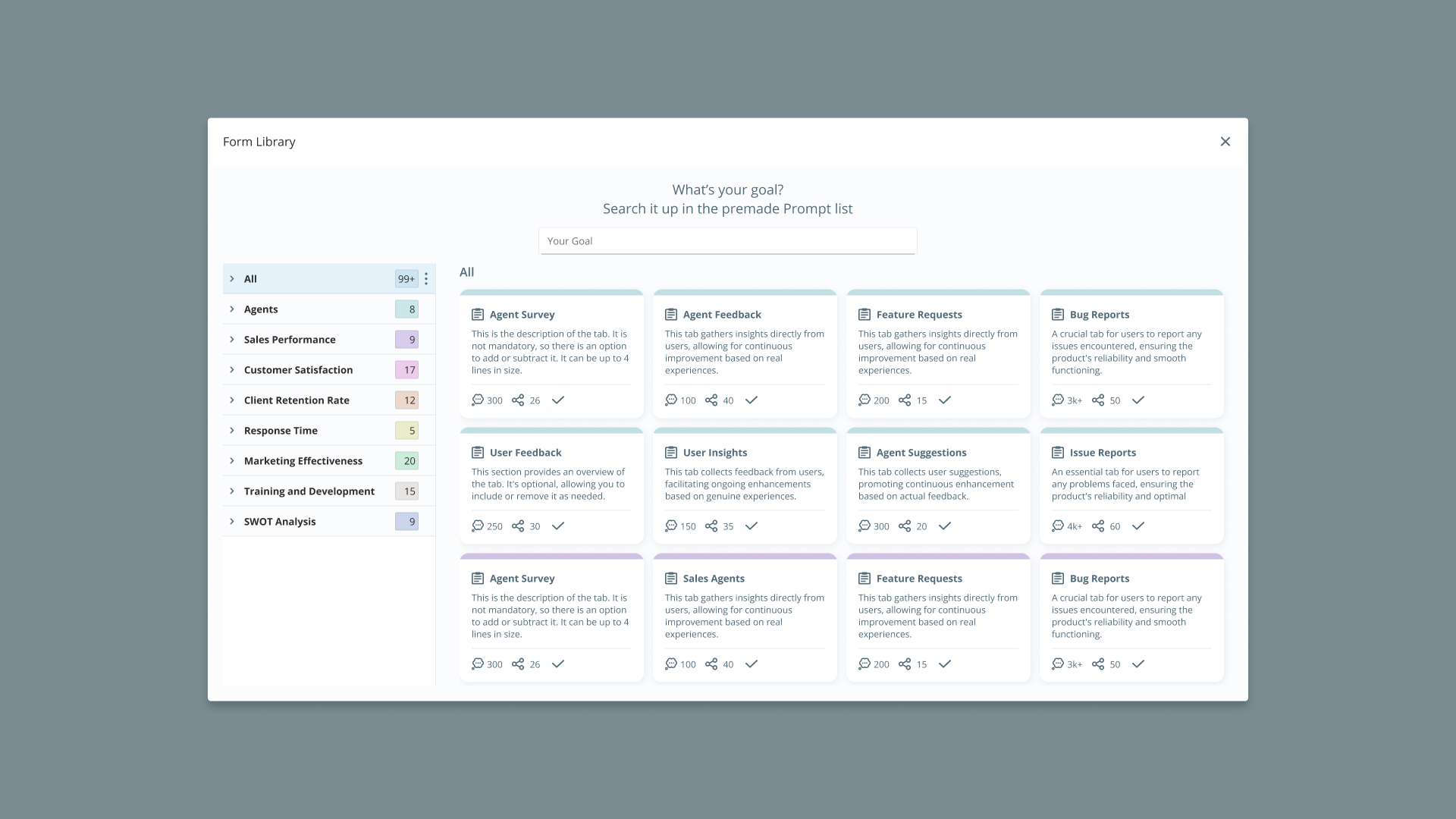
Form Library
From confusing navigation - to creating a coherent flow
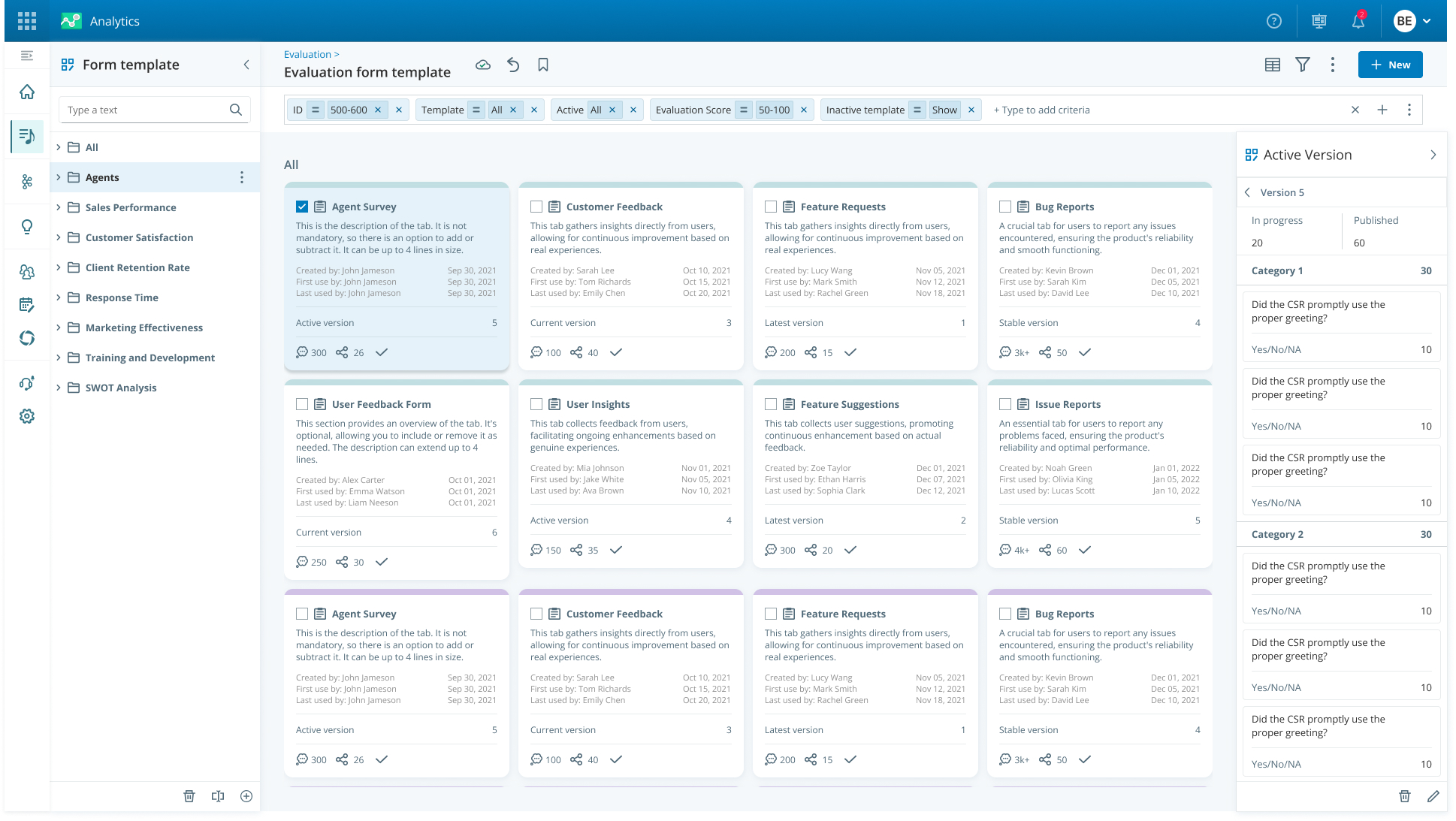
The old system, although it required three basic steps (data entry, category selection, and question creation), presented the user with a "blank page" with many actions that were disabled, which created uncertainty and difficulty in starting work. The user was not guided to take any action.
- Beyond Guided Flow: I changed the flow to be Fluid and flowing, so that the system guides the user and forces them to go through the three basic steps in an intuitive "step by step" manner.
- Contextual AI Suggestions: The system utilizes existing data to offer relevant suggestions in real time (Contextual Suggestions). These suggestions are based on:
- The subject of the form entered.
- The location of the question within the form.
- Additional questions that may be relevant.
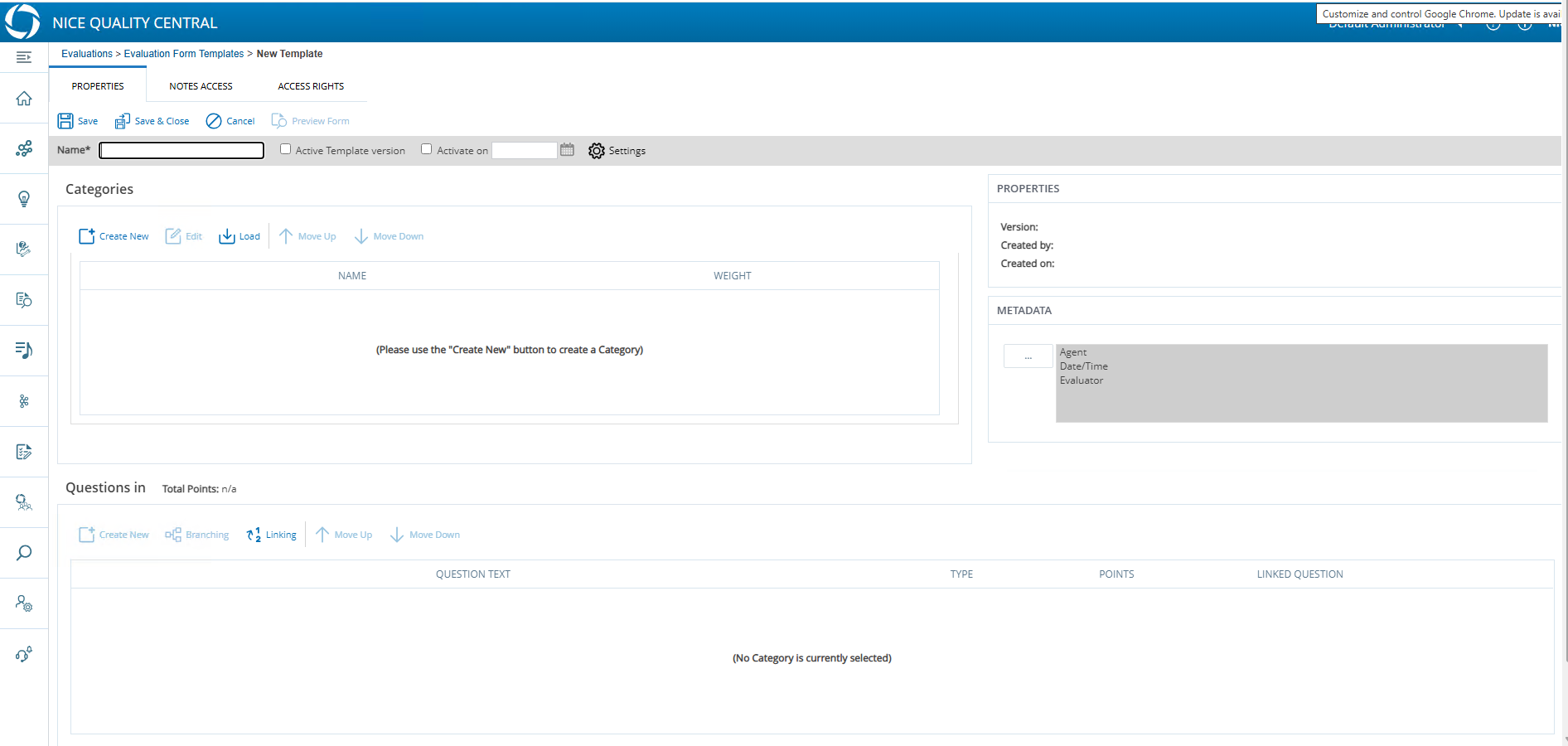
Form Structure Old
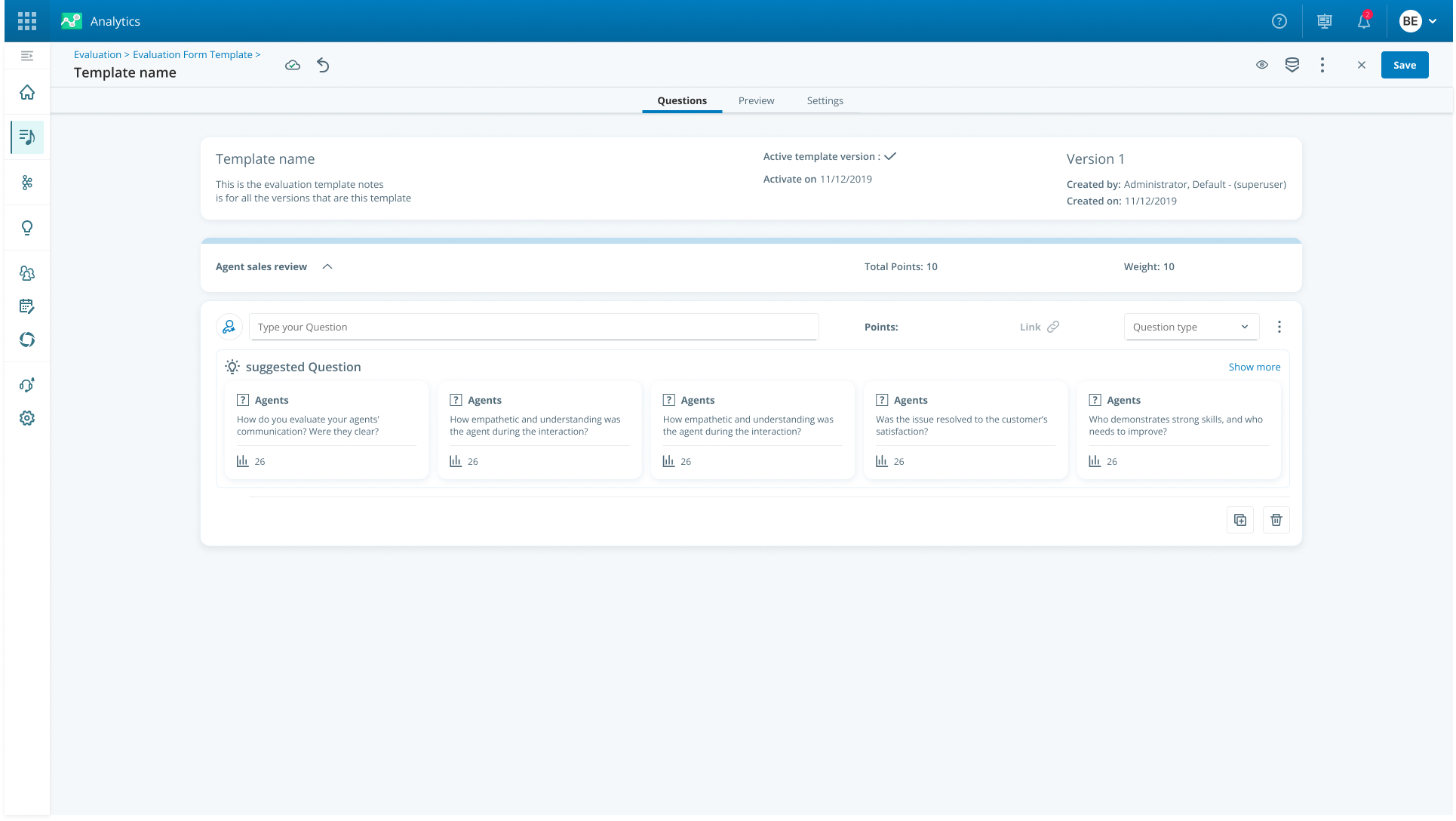
Form Structure New
Reducing cognitive load and focus
The old question creation interface suffered from two critical problems
- Multiple Choice Illusion: The displayed columns created the illusion that multiple choices could be made (from each of them), when in reality it was a single choice from three critical options – which created confusion for the customer.
- Cognitive Load: All answers and fields were presented to the user at the same time, which created a lot of load and made it difficult to focus.
The old question creation interface suffered from two critical problems:
- Multiple Choice Illusion: The displayed columns created the illusion that multiple choices could be made (from each of them), when in reality it was a single choice from three critical options – which created confusion for the customer.
- Cognitive Load: All answers and fields were presented to the user at the same time, which created a lot of load and made it difficult to focus.
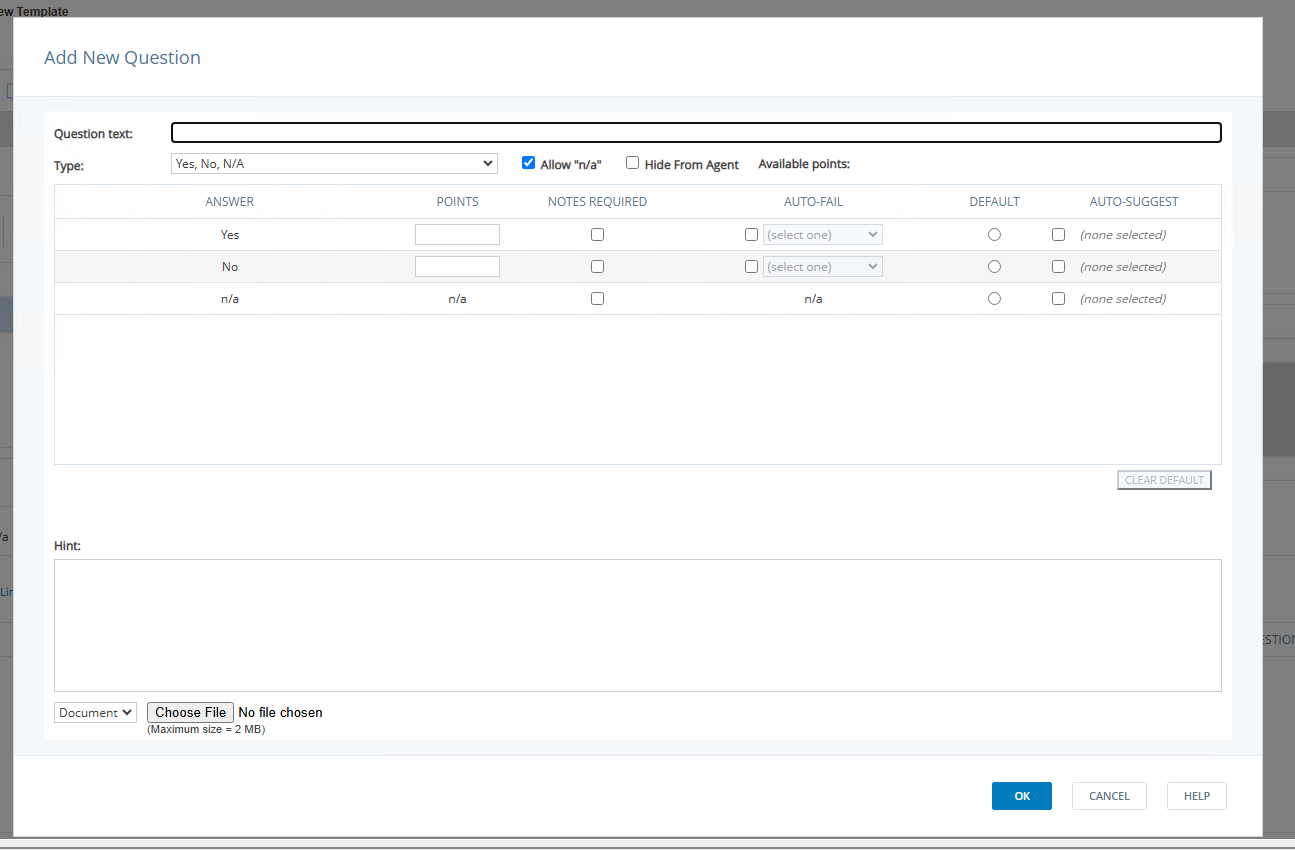
Question Structure Old
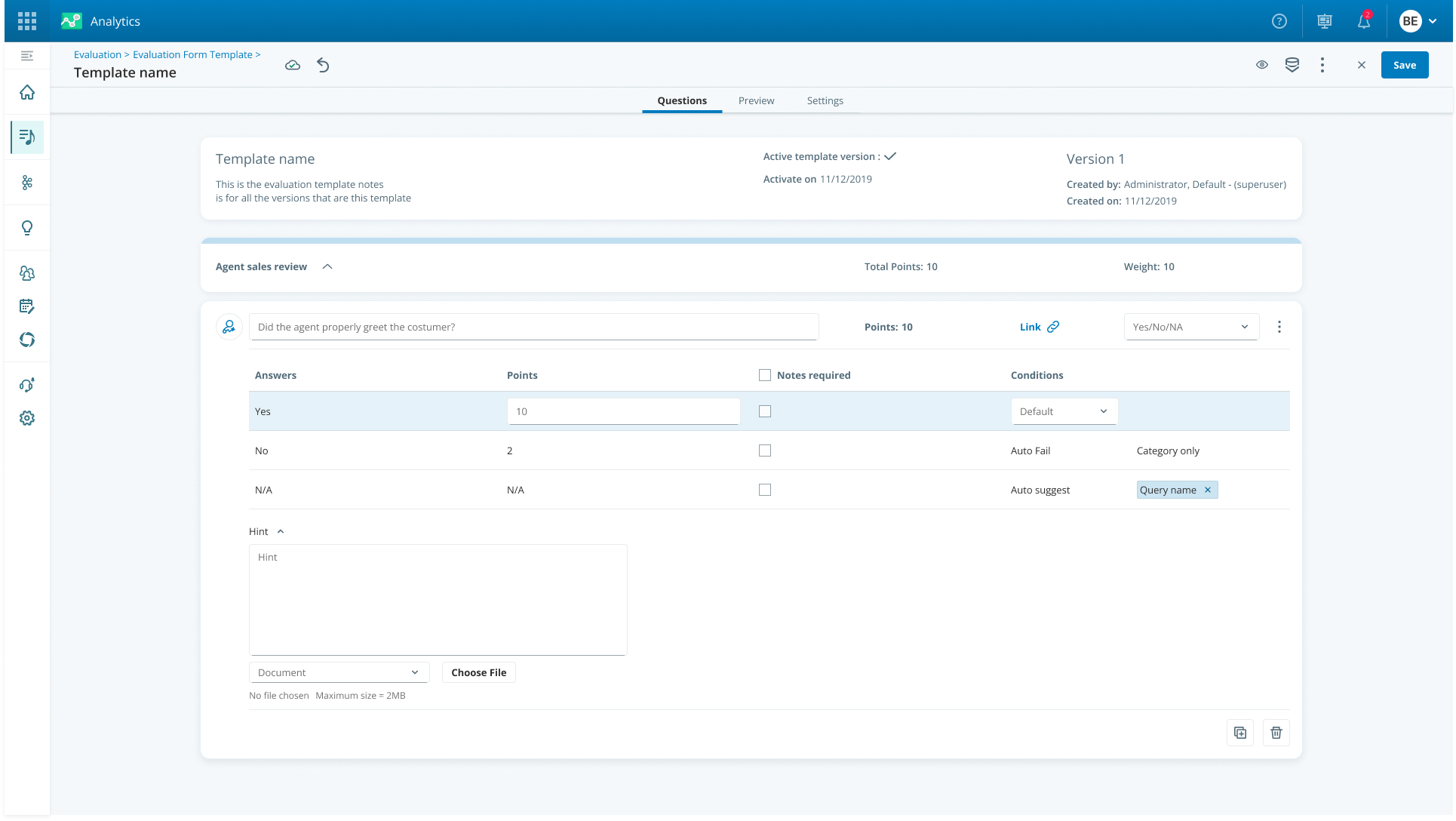
Question Structure New
Focused, consistent and simple design
- Simplifying the selection: I reduced columns and replaced them with a dropdown to emphasize that it is a single choice, thus eliminating the illusion of multiple selection.
- Cognitive focus: Implementing the "one action at a time" principle by highlighting the edited field and hiding the rest of the data, which ensured maximum focus and reduced clutter.
- UX/UI improvement: Implementing an innovative design that is compatible with the Design System, and keeping the user inside the form (Inline Editing) for a seamless experience.
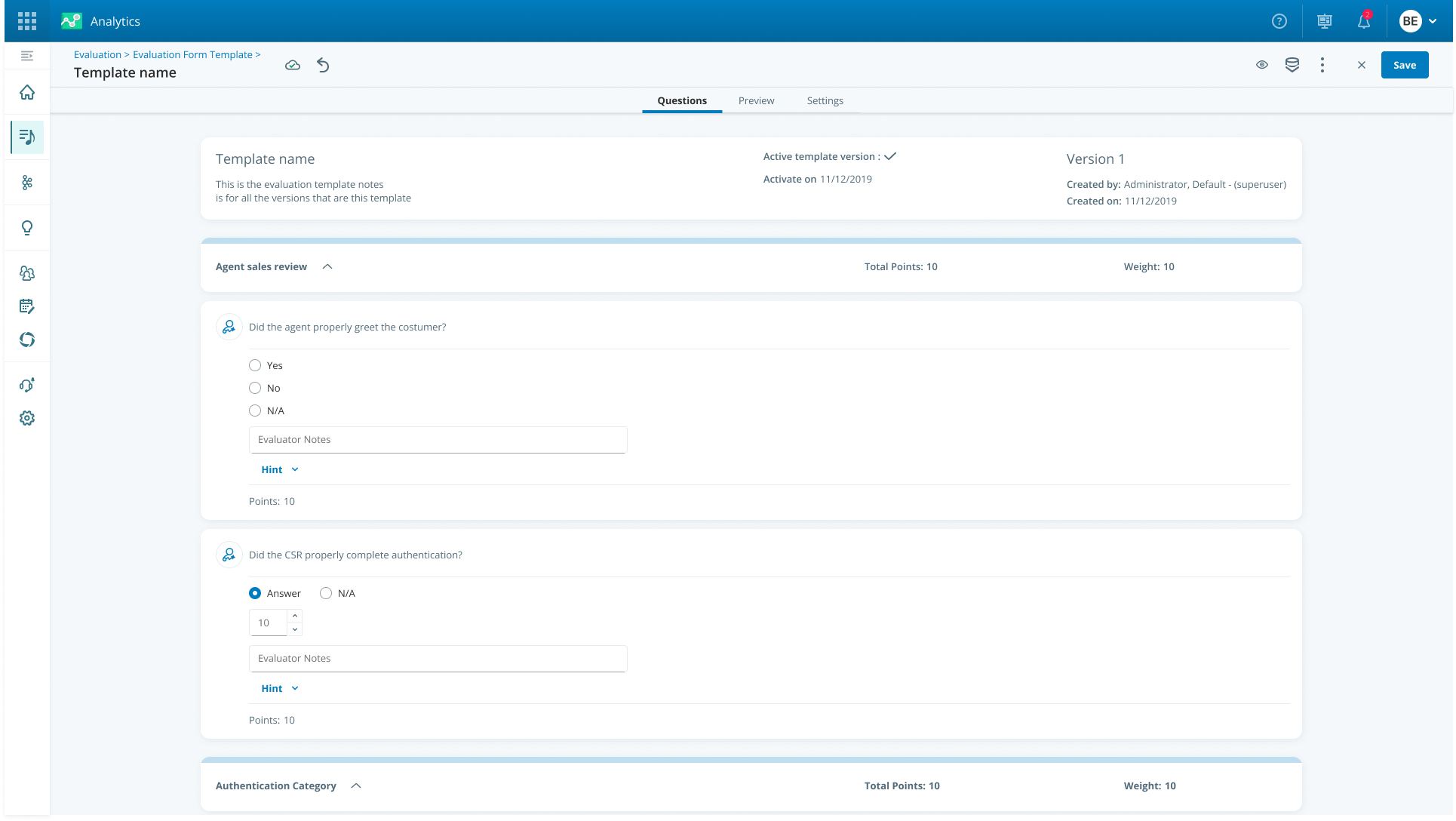
Form
Effect
The project achieved overwhelming success on several levels: First, it created significant time savings and dramatically improved the ease of use of the core system, while receiving immediate positive feedback from customers. Second, I resolved the structural issues (UX debt and “patchwork”) and aligned the system to the Design System. Finally, I strategically positioned the system by preparing an AI-ready infrastructure and advanced capabilities (such as Prompting), which led the entire product line to a new standard.

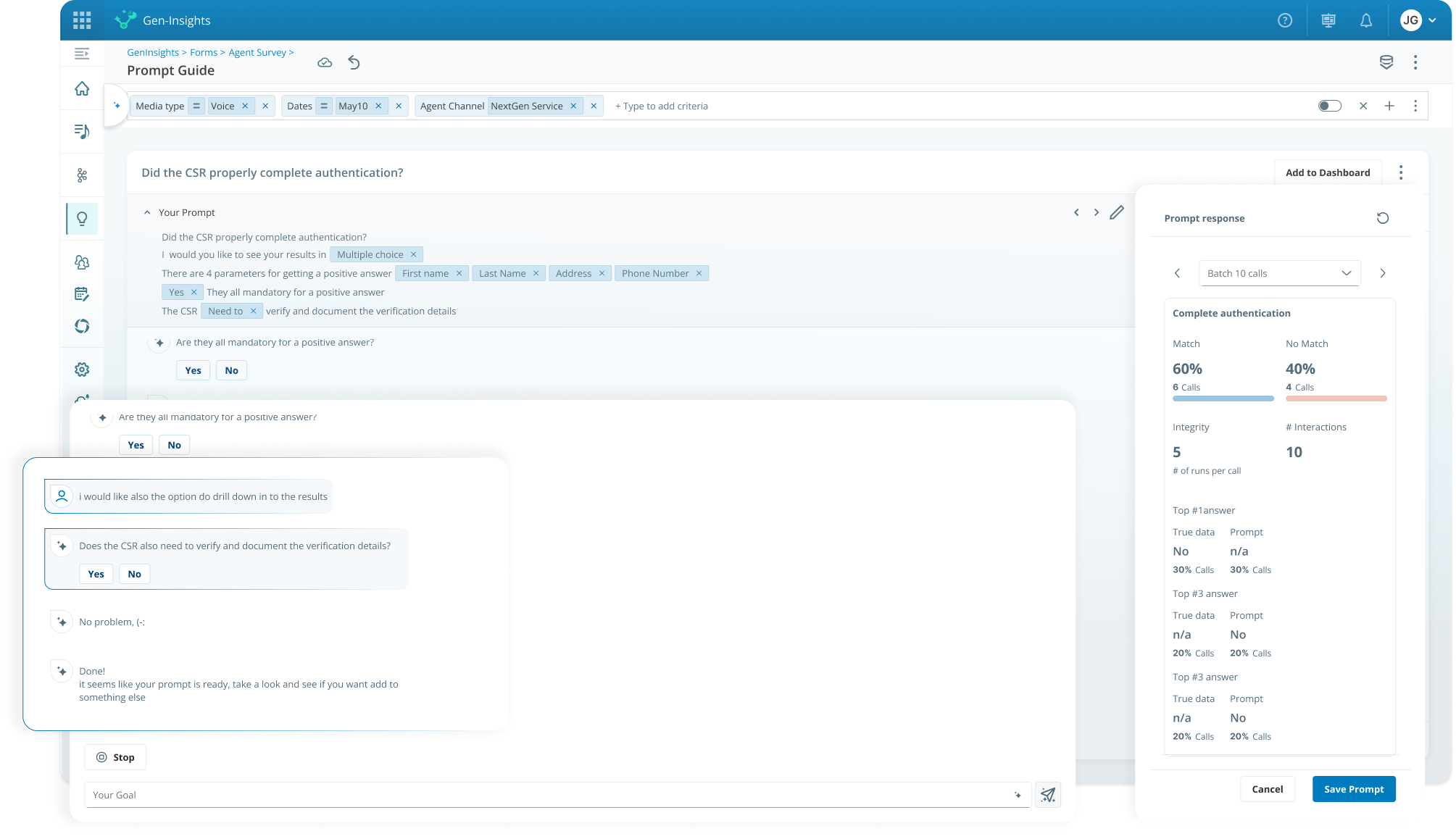
Ready to create
great things
Got a complex challenge? Let's solve it together.
Let's talk

Download Resume




Form Builder Evolution
Fixing UX debt, aligning the Design System, and preparing AI infrastructure.
B2B
Ai
Complex system
Summary
Background
The evaluation form creation system is a critical core process that suffered from accumulated "UX debt" and lack of intuitiveness. The goal of the project was a comprehensive renobilization of the system: full alignment with the Design System, thorough treatment of UX deficiencies, and preparation of the necessary infrastructure to integrate innovative AI capabilities into the next generation of evaluation forms.
Main challenge
- Critical Change Management: Renovating a core system in ongoing use while ensuring acceptance of the change and maintaining business continuity.
- UX Debt Repair: Simplifying a complex system built in a “patchwork” manner by remapping the information architecture.
- Preparing the foundation for AI: Implementing initial capabilities and preparing the infrastructure for using prompt-based questions.
CLIENT
Nice
SERVICES
- B2B
- Ai
- Complex system
Impact
The project achieved immediate success and full user adoption, leading to time savings and a dramatic improvement in the ease of use of the core system. I led a thorough remediation of the accumulated UX debt, aligned the system to the Design System, and strategically positioned it by preparing the infrastructure for the integration of advanced AI capabilities.
Dramatically Faster Form Creation
The guided step-by-step flow cut the time needed to build a new form.
Errors Nearly Eliminated
Contextual AI suggestions and a simplified flow removed the mistakes that used to sabotage the process.
AI Made Accessible
Work process
Research and in-depth understanding
I started with in-depth research on the system until I understood it from the ground up. I spoke with dozens of people – product managers, customers and stakeholders – to gain a deep understanding of the problems, new requirements and the company’s vision for the product.
Steps
01
Research & Core Understanding
I deeply investigated the system and held conversations with dozens of users and stakeholders to understand the problems, new requirements, and the company's vision.
02
Architectural Characterization & Mapping
I re-mapped the information architecture, existing and future Use Cases and User Flows, and defined the new capabilities required, including an AI base.
New Guided Flow
STEP 1
Enter Form Data
→
STEP 2
Select Category
→
STEP 3
Create Questions
AI ASSIST
Contextual Suggestions at Every Step
03
UX Design & Simplification
I built components from Atomic Units and mapped each process while thinking about parallel effects to address the accumulated UX deficiencies.
04
Validation & Sharing
I regularly shared progress with managers and colleagues to ensure that goals were met and that the change was accepted by all users.
Examples
The Resoults
After a series of targeted questions, a long and precise prompt is created in the background aimed at optimal assessment.
After a series of targeted questions, a long and precise prompt is created in the background aimed at optimal assessment.
Form Library
The Resoults
The old system, although it required three basic steps (data entry, category selection, and question creation), presented the user with a "blank page" with many actions that were disabled, which created uncertainty and difficulty in starting work. The user was not guided to take any action.
- Beyond Guided Flow: I changed the flow to be Fluid and flowing, so that the system guides the user and forces them to go through the three basic steps in an intuitive "step by step" manner.
- Contextual AI Suggestions: The system utilizes existing data to offer relevant suggestions in real time (Contextual Suggestions). These suggestions are based on:
- The subject of the form entered.
- The location of the question within the form.
- Additional questions that may be relevant.
Form Structure Old
Form Structure New
The Resoults
The old question creation interface suffered from two critical problems:
- Multiple Choice Illusion: The displayed columns created the illusion that multiple choices could be made (from each of them), when in reality it was a single choice from three critical options – which created confusion for the customer.
- Cognitive Load: All answers and fields were presented to the user at the same time, which created a lot of load and made it difficult to focus.
The old question creation interface suffered from two critical problems:
- Multiple Choice Illusion: The displayed columns created the illusion that multiple choices could be made (from each of them), when in reality it was a single choice from three critical options – which created confusion for the customer.
- Cognitive Load: All answers and fields were presented to the user at the same time, which created a lot of load and made it difficult to focus.
After a series of targeted questions, a long and precise prompt is created in the background aimed at optimal assessment.
Question Structure Old
Question Structure New
The Resoults
- Simplifying the selection: I reduced columns and replaced them with a dropdown to emphasize that it is a single choice, thus eliminating the illusion of multiple selection.
- Cognitive focus: Implementing the "one action at a time" principle by highlighting the edited field and hiding the rest of the data, which ensured maximum focus and reduced clutter.
- UX/UI improvement: Implementing an innovative design that is compatible with the Design System, and keeping the user inside the form (Inline Editing) for a seamless experience.
Focused, consistent and simple design
After a series of targeted questions, a long and precise prompt is created in the background aimed at optimal assessment.
After a series of targeted questions, a long and precise prompt is created in the background aimed at optimal assessment.
Form
Effect
The result is a product that has gained widespread customer adoption due to its simplicity and reliability, creating a significant competitive advantage for the company.
Work process
Research and in-depth understanding
I started with in-depth research on the system until I understood it from the ground up. I spoke with dozens of people – product managers, customers and stakeholders – to gain a deep understanding of the problems, new requirements and the company’s vision for the product.
Ready to create
great things
Got a complex challenge? Let's solve it together.
Let's talk
Download Resume

Form Builder Evolution
Fixing UX debt, aligning the Design System, and preparing AI infrastructure.
B2B
Ai
Complex system
Summary
Background
I took on the task of fixing what had become the most critical core system – the Form creation system, which suffered from accumulating "UX debt" and lost its intuitiveness. My goal was twofold: to lead a comprehensive renovation that would align the system with the current Design System standard, and at the same time, prepare the architectural infrastructure that would enable the seamless implementation of advanced AI capabilities, to ensure that the product would be relevant and leading in the next generation.
Main challenge
- Critical Change Management: Renovating a core system in ongoing use while ensuring acceptance of the change and maintaining business continuity.
- UX Debt Repair: Simplifying a complex system built in a “patchwork” manner by remapping the information architecture.
- Preparing the foundation for AI: Implementing initial capabilities and preparing the infrastructure for using prompt-based questions.
CLIENT
Nice
SERVICES
- B2B
- Ai
- Complex system
Impact
The project achieved immediate success and full user adoption, leading to time savings and a dramatic improvement in the ease of use of the core system. I led a thorough remediation of the accumulated UX debt, aligned the system to the Design System, and strategically positioned it by preparing the infrastructure for the integration of advanced AI capabilities.
Dramatically Faster Form Creation
The guided step-by-step flow cut the time needed to build a new form.
Errors Nearly Eliminated
Contextual AI suggestions and a simplified flow removed the mistakes that used to sabotage the process.
AI Made Accessible
Work process
Research and in-depth understanding
I started with in-depth research on the system until I understood it from the ground up. I spoke with dozens of people – product managers, customers and stakeholders – to gain a deep understanding of the problems, new requirements and the company’s vision for the product.
Steps
01
Research & Core Understanding
I deeply investigated the system and held conversations with dozens of users and stakeholders to understand the problems, new requirements, and the company's vision.
02
Architectural Characterization & Mapping
I re-mapped the information architecture, existing and future Use Cases and User Flows, and defined the new capabilities required, including an AI base.
New Guided Flow
STEP 1
Enter Form Data
→
STEP 2
Select Category
→
STEP 3
Create Questions
AI ASSIST
Contextual Suggestions at Every Step
03
UX Design & Simplification
I built components from Atomic Units and mapped each process while thinking about parallel effects to address the accumulated UX deficiencies.
04
Validation & Sharing
I regularly shared progress with managers and colleagues to ensure that goals were met and that the change was accepted by all users.
Examples
AI-Assisted Template Builder
- I overcame the challenge of the “blank page” and non-personalized templates. The solution is an AI-driven smart recommendation system, which allows the user to enter their wishes and receive instant recommended categories. The system allows for the assembly and customization of templates from multiple sources.
- The project dramatically accelerated form creation, ensured higher quality and consistency in assessments, and implemented intelligent guidance for users throughout the entire form building process.
Form Library
From confusing navigation - to creating a coherent flow
The old system, although it required three basic steps (data entry, category selection, and question creation), presented the user with a "blank page" with many actions that were disabled, which created uncertainty and difficulty in starting work. The user was not guided to take any action.
- Beyond Guided Flow: I changed the flow to be Fluid and flowing, so that the system guides the user and forces them to go through the three basic steps in an intuitive "step by step" manner.
- Contextual AI Suggestions: The system utilizes existing data to offer relevant suggestions in real time (Contextual Suggestions). These suggestions are based on:
- The subject of the form entered.
- The location of the question within the form.
- Additional questions that may be relevant.
Form Structure Old
Form Structure New
Reducing cognitive load and focus
The old question creation interface suffered from two critical problems:
- Multiple Choice Illusion: The displayed columns created the illusion that multiple choices could be made (from each of them), when in reality it was a single choice from three critical options – which created confusion for the customer.
- Cognitive Load: All answers and fields were presented to the user at the same time, which created a lot of load and made it difficult to focus.
The solution: Focused, consistent and simple design
- Simplifying the selection: I reduced columns and replaced them with a dropdown to emphasize that it is a single choice, thus eliminating the illusion of multiple selection.
- Cognitive focus: Implementing the "one action at a time" principle by highlighting the edited field and hiding the rest of the data, which ensured maximum focus and reduced clutter.
- UX/UI improvement: Implementing an innovative design that is compatible with the Design System, and keeping the user inside the form (Inline Editing) for a seamless experience.
Question Structure Old
Question Structure New
Focused, consistent and simple design
- Simplifying the selection: I reduced columns and replaced them with a dropdown to emphasize that it is a single choice, thus eliminating the illusion of multiple selection.
- Cognitive focus: Implementing the "one action at a time" principle by highlighting the edited field and hiding the rest of the data, which ensured maximum focus and reduced clutter.
- UX/UI improvement: Implementing an innovative design that is compatible with the Design System, and keeping the user inside the form (Inline Editing) for a seamless experience.
Form
Effect
Dramatic savings in resources:
Full automation of the agent evaluation process, which led to huge savings in time and manpower required for manual testing.
Improved accuracy and objectivity:
Eliminating human bias and reducing the percentage of errors and inconsistencies in scores. The system provides a consistent and reliable evaluation.
Making AI accessible and innovative:
- Removing the knowledge barrier in Prompt Engineering through a conversational interface, thus making complex AI technology accessible to all users in a convenient way.
- Positioning the company as an innovation leader in the field of AI.
In one sentence: The project created huge savings in resources and dramatically improved the accuracy and objectivity of the evaluation, while leading the company and customers to convenient and accessible use of advanced AI tools
Ready to create
great things
Got a complex challenge? Let's solve it together.
Let's talk
Download Resume
